Use a Marketing Budget Allocation Template That Can Change
Use a marketing budget allocation template for channel planning, monthly pacing, scenarios, actuals, and evidence-based reallocation.
A good marketing budget allocation template does one job. It turns spend data into a decision. If your template only records numbers, it will not help you act. This article shows how to build a template around six parts: structure, targets, channel plan, pacing, confidence, and reforecast steps.
Template structure
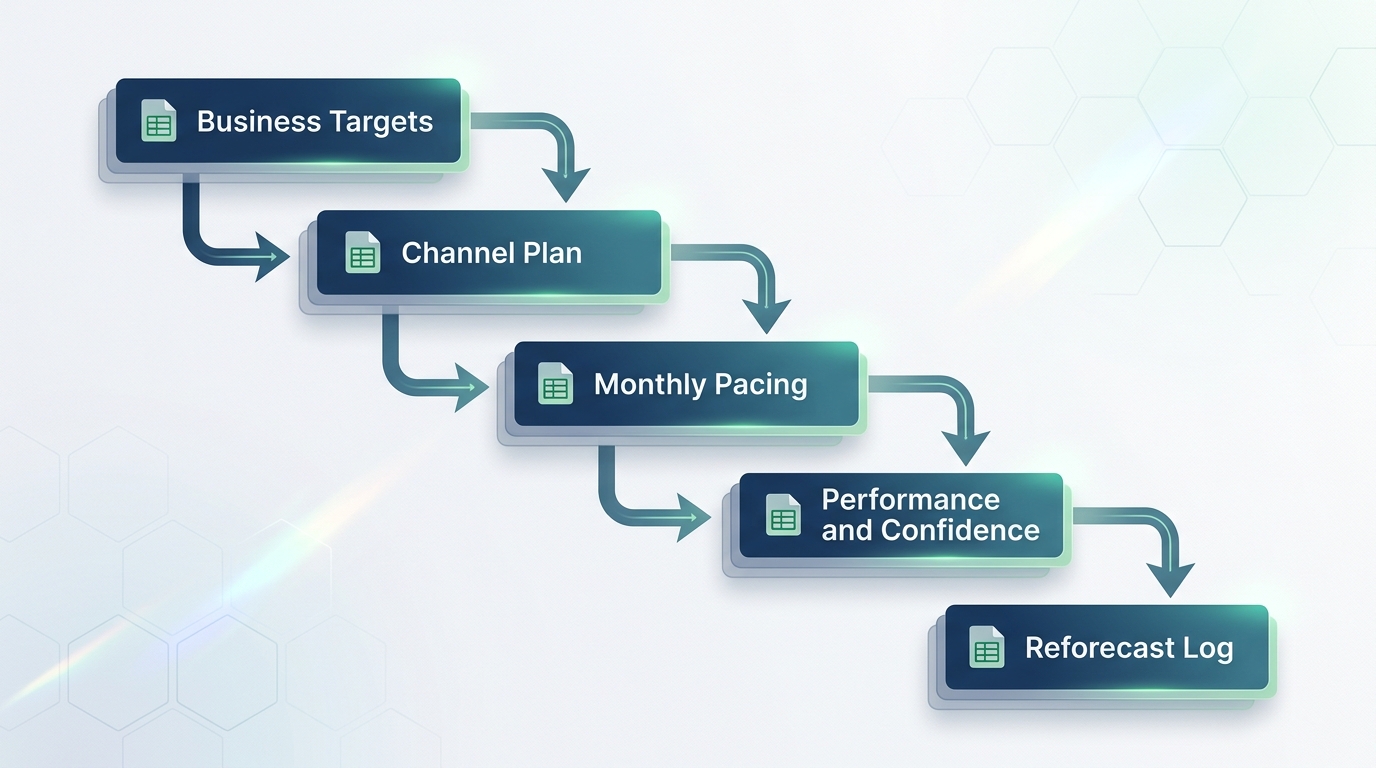
A marketing budget allocation template needs a clear structure before you add numbers. Build it as a workbook with linked sheets, not one large tab. Each sheet has one job. Each sheet feeds the next sheet.
Use this basic structure:
- Business targets sheet. States revenue, pipeline, or retention goals.
- Channel plan sheet. Lists each channel, its role, and planned spend.
- Monthly pacing sheet. Tracks planned spend against actual spend by month.
- Performance and confidence sheet. Shows ROAS, cost per result, and how much you trust each number.
- Reforecast log. Records decisions, dates, and reasons for change.
This structure matches common practice in marketing budget templates. Many templates separate planned figures, actual figures, and rollups so teams can spot variance fast. See Smartsheet's collection of marketing budget templates. A monthly marketing budget spreadsheet built this way stays simple even when you manage many channels or regions.
Business targets
Every marketing spend template must start with a stated business goal. Write down what the spend must do. Is the goal new pipeline, revenue growth, retention, or entry into a new market? This choice sets your guardrails. Guardrails include minimum brand spend, maximum acceptable cost per acquisition, and required always-on spend. Industry guidance on marketing budget allocation best practices echoes this point.
Add three fields to this sheet:
- Primary goal (one sentence)
- Numeric target (dollar amount or percent growth)
- Time window (quarter or year)
Keep this sheet short. If you cannot state the goal in one sentence, the plan is not ready. For a deeper look at goal-setting for spend decisions, see our guide on marketing budget allocation.
Channel plan
The channel plan sheet is the core of your channel budget template. Give each channel a defined role, such as capture, nurture, or expand. Fund each role based on its marginal return, not its average return. Marginal return means the extra result you get from the next dollar you spend, not the average result across all dollars spent so far.
Marginal return matters more than average return. A channel with a strong average ROAS may still sit near saturation. Saturation means the next dollar spent returns much less than the last dollar did. When marginal return is low, that channel has little room left to grow. In contrast, a channel with steady marginal return still has room to scale. This budget allocation framework explains this principle in detail.
Use a simple table like this hypothetical example:
| Channel | Role | Monthly Spend | Reported Conversions | Revenue per Conversion | Rough ROAS |
|---|---|---|---|---|---|
| Search | Capture | $20,000 | 400 | $150 | 3.0x |
| Social | Nurture | $15,000 | 200 | $150 | 2.0x |
| Display | Expand | $8,000 | 60 | $150 | 0.6x |
This is a hypothetical example, not real data. Discount platform-reported conversions by 30 to 50 percent to account for overlap between channels. Platforms often claim credit for the same conversion.
Three evidence methods can inform this table. They are not the same thing:
- Attribution assigns credit to touchpoints in a single customer journey. It shows what happened, but not what would have happened without the ad.
- Incrementality testing measures the lift a channel causes. It compares exposed and unexposed groups. It answers whether the spend caused the result.
- Marketing mix modeling (MMM) uses statistical models across many channels and time periods to estimate each channel's contribution to total revenue. It accounts for factors like seasonality and the lagged effect of past spend, known as adstock.
Each method has limits. Use more than one method when you can. For a full explanation of these methods, see our guide on marketing ROI analysis.
Monthly pacing
The monthly pacing sheet compares planned spend to actual spend by month. This is the budget-versus-actual view that most finance teams expect. Without it, you cannot see drift until the quarter ends.
Track four columns for each channel, each month:
- Planned spend
- Actual spend
- Variance (dollar and percent)
- Notes on cause
A monthly marketing budget spreadsheet built this way lets you catch overspend or underspend early. Templates from vendors such as HubSpot include a similar view. They show budget and actual spend by department alongside a chart that tracks trends over time. See this budget planner guide.
Performance and confidence
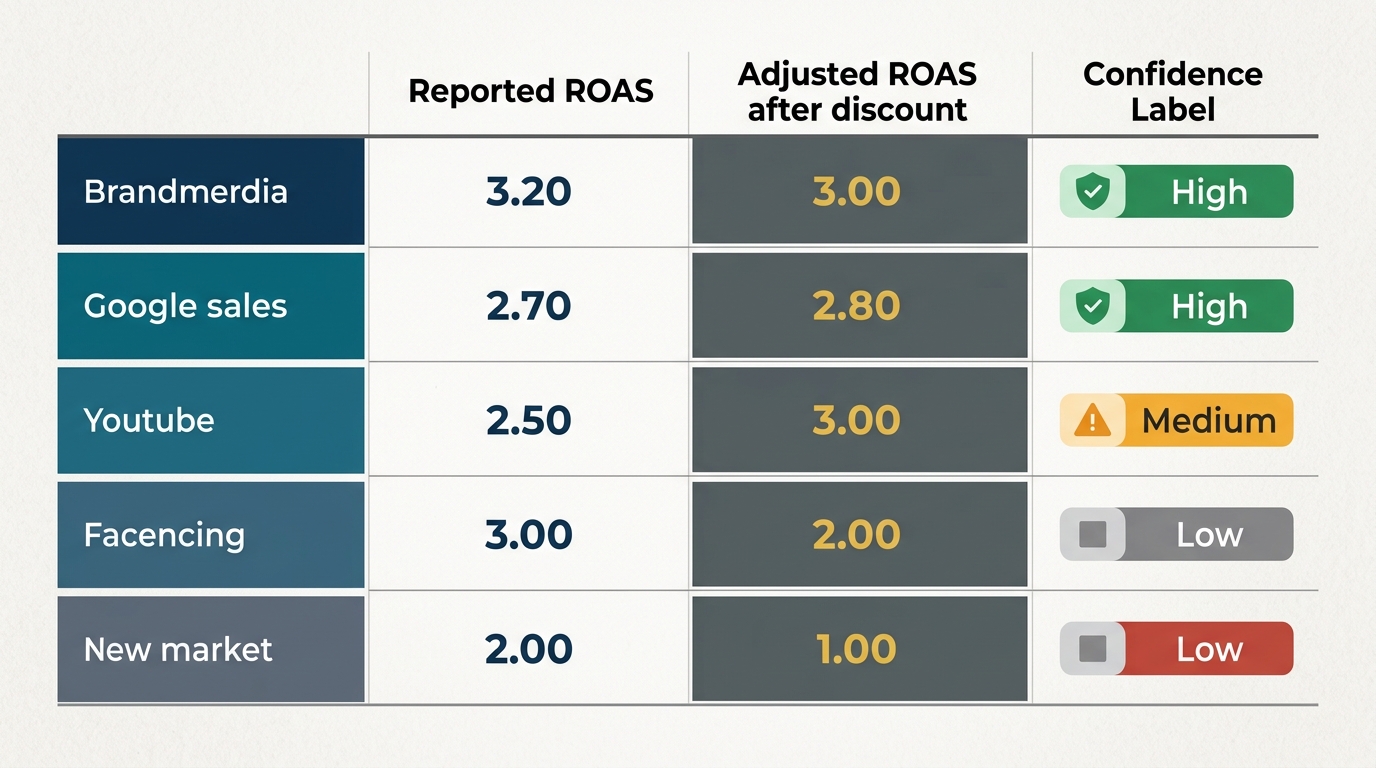
Numbers alone do not tell you how much to trust them. Add a confidence rating to each channel's performance data. This rating separates channels with strong evidence from channels with thin or noisy data.
Rate confidence using three simple levels:
- High. Backed by a completed incrementality test or a stable MMM result across several months.
- Medium. Backed by attribution data alone, with known overlap risk.
- Low. Based on a new channel or short time window with little data.
This sheet becomes your ROAS planning sheet. It should show reported ROAS, an adjusted ROAS after discounting for overlap, and the confidence level. A channel with high average ROAS but low confidence deserves caution before you increase its budget. Our guide to media budget optimization covers how to weigh confidence against return when you set next month's spend.
Reforecast workflow
A template only helps if you use it to make a decision. Build in a reforecast workflow with a clear review cadence and clear triggers for change.
Set a cadence in two layers. This follows common practice from teams that separate light checks from full decisions, as noted in this marketing budget allocation guide:
- Weekly light review. Scan for large swings in spend or cost per result. Do not reallocate yet.
- Monthly decision review. Compare actual results to plan. Decide whether to shift budget.
Write clear rules for when to move money. For example, a rule might state: cut a channel budget by 15 percent if its acquisition cost rises 20 percent for two straight weeks. Shift the cut amount to the next-highest confidence channel. Keep these rules in your reforecast log with the date and the name of the person who approved the change.
Also keep a scenario budget template on hand. Build two or three simple scenarios, such as a 20 percent cut, a flat plan, and a 30 percent increase. Note the expected effect on each channel based on its marginal return. This turns your workbook into a planning tool instead of a static record.
Separate testing budget from proven budget in every reforecast cycle. New channels or new audiences need room to test. Test spend must never take money away from the channels that carry your core targets.
Conclusion
A marketing budget allocation template earns its place only when it drives a decision. Build it around clear targets and a channel plan tied to marginal return. Add honest pacing against actuals and a confidence rating for each number. Finish it with a clear reforecast workflow. Static spreadsheets go stale within a quarter. A template built around decisions stays useful because it forces the same six questions every time you review spend.
Do you want a model-informed version of this workflow that uses MMM output? We can help you build it around your own data and targets.

Stay in the loop
Get updates on new posts and resources.